
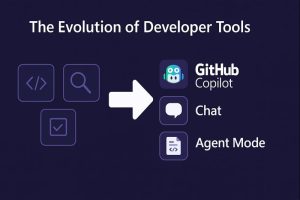
This year at Microsoft Build 2025, I had the honor of presenting a session on one of the most exciting evolutions in developer tooling: GitHub Copilot Agent Mode.

In my session, “From Autocomplete to Autonomous Agents”, I explored how AI is rapidly moving beyond suggesting lines of code — toward planning, building, and collaborating alongside developers to create real-world solutions.
If you missed it, or just want a quick summary, here’s a breakdown of what we covered — and why it matters.
Setting the Stage: Copilot Today
I started by revisiting what many developers already know: GitHub Copilot as an AI pair programmer.
Today, Copilot helps us autocomplete functions, fix bugs, and accelerate our workflows — right inside our favorite editors like VS Code and Visual Studio.
But coding with AI is evolving fast.
The Rise of Conversational Coding: Copilot Chat
Next, I introduced Copilot Chat — a major leap where developers can now talk to their codebases.
Instead of hunting for solutions across forums and Stack Overflow, developers can:
-
Ask Copilot to explain tricky functions
-
Request test generation
-
Refactor code blocks
-
Debug slow performance
Conversational coding makes AI feel less like a tool, and more like a teammate.
Beyond Chat: GitHub Copilot Agent Mode
Then we crossed the bridge into the future: Copilot Agent Mode.
Agent Mode moves beyond completing code snippets.
It understands tasks, plans multi-step solutions, and executes actions across codebases and terminals — all from natural language prompts.
It’s the first glimpse of autonomous software agents in real-world development.
Live Demo: Building a Flight Deals Tracker
To showcase this, I led a live demo where we built a Flight Deals Tracker App — from scratch — just by describing it to Copilot Agent Mode.
In a few simple prompts, Copilot:
-
Scaffolded a web app
-
Displayed cheap flight deals
-
Added a price filter
-
Made it mobile responsive
-
Prepared deployment to Azure
No boilerplate typing. No manual setup.
Just building at the speed of ideas.
Real-World Use Cases
I also highlighted real examples shared by the GitHub community:
-
Adding secure authentication flows
-
Transforming CSV data into markdown reports
-
Generating project health reports across repositories
Agent Mode isn’t science fiction — it’s already being used to solve practical, everyday developer problems.
Want to Learn More?
GitHub has released a hands-on learning module where you can try Agent Mode today:
-
Write prompts
-
Analyze AI-generated pull requests
-
Explore how autonomous agents think through tasks
If you’re a developer looking to stay ahead of the curve, now’s the time to experiment.
Final Thoughts
Presenting at Build 2025 was an incredible experience — not just to showcase technology, but to imagine what the future of coding could look like.
AI won’t replace developers.
But it will redefine what developers can achieve.
As GitHub Copilot evolves into an autonomous agent, the most powerful thing you can do is learn how to work alongside it — and build even bigger.